Design Smarter, Not Harder: How Figma Design System Templates Can Boost Your Productivity
Design systems are crucial for maintaining consistency in your designs, but creating them from scratch can be time-consuming. That's where Figma design system templates come in. In this article we discuss the importance of design systems and the benefits of using Figma design system templates for your design workflow.
Actualizado el 14 de abril de 2023
#figma
About Figma
Figma is a popular design tool that is used by designers all over the world. One of the best features of Figma is its ability to create design systems. A design system is a collection of reusable components, guidelines, and assets that help designers maintain consistency in their designs. Creating a design system from scratch can be time-consuming, so many designers turn to Figma design system templates to speed up the process.
Figma design systems
Figma design system templates are pre-built design systems that can be customized to fit your needs. They come with pre-designed components, styles, and assets that can be used across your entire project. These templates can be a huge time saver and can help ensure that your design is consistent throughout.
Figma design systems
Figma design system templates are pre-built design systems that can be customized to fit your needs. They come with pre-designed components, styles, and assets that can be used across your entire project. These templates can be a huge time saver and can help ensure that your design is consistent throughout.
Benefits
One of the best things about Figma design system templates is their flexibility. They can be used for a variety of projects, from websites to mobile apps. The templates are also designed to be easy to use, even if you're not a Figma expert. You can quickly drag and drop components onto your design canvas, and customize them to fit your needs.
One of the best things about Figma design system templates is their flexibility. They can be used for a variety of projects, from websites to mobile apps. The templates are also designed to be easy to use, even if you're not a Figma expert. You can quickly drag and drop components onto your design canvas, and customize them to fit your needs.
Another benefit of Figma design system templates is their documentation. The templates come with a set of guidelines that help ensure that your designs are consistent. The guidelines cover everything from typography to spacing and can be customized to fit your brand. This makes it easy to maintain consistency throughout your project, even if you're working with a team.
Why design systems?
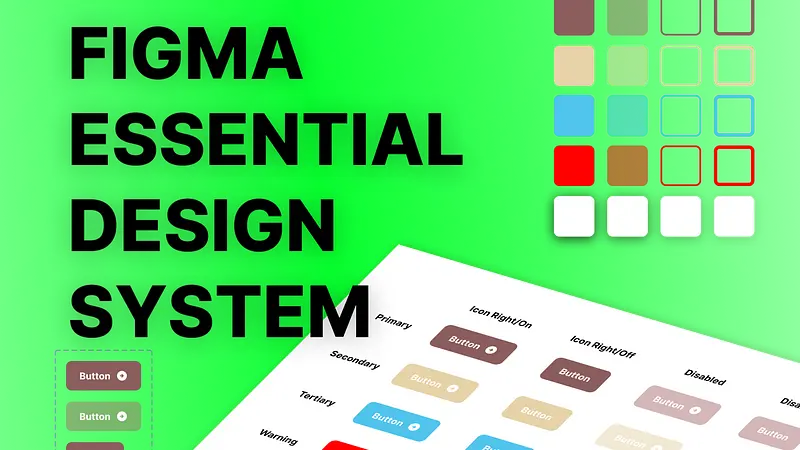
In addition to these benefits, there are also many specific benefits to using a Figma design system template like the "Figma Essential Design System". This template includes grid layouts, typography, colors, and components, specifically variant buttons.
In addition to these benefits, there are also many specific benefits to using a Figma design system template like the "Figma Essential Design System". This template includes grid layouts, typography, colors, and components, specifically variant buttons.
Grid layouts
Grid layouts are important in creating consistent designs, as they ensure that elements are placed correctly on the canvas. The "Figma Essential Design System" includes pre-built
grid layouts that can be used to create designs quickly and easily.
Grid layouts are important in creating consistent designs, as they ensure that elements are placed correctly on the canvas. The "Figma Essential Design System" includes pre-built
grid layouts that can be used to create designs quickly and easily.
Typography
Typography is another crucial aspect of design, as it helps convey the tone and message of a design. The "Figma Essential Design System" includes a set of typography styles
that can be easily modified to fit your brand.
Typography is another crucial aspect of design, as it helps convey the tone and message of a design. The "Figma Essential Design System" includes a set of typography styles
that can be easily modified to fit your brand.
Colors
Colors are an important element of design as they help establish brand identity and create visual interest. The "Figma Essential Design System" includes a set of color palettes that can be used across your entire project to ensure consistency.
Colors are an important element of design as they help establish brand identity and create visual interest. The "Figma Essential Design System" includes a set of color palettes that can be used across your entire project to ensure consistency.
Components
Components are pre-built design elements that can be used repeatedly throughout a project to ensure consistency and save time. The "Figma Essential Design System" includes a variety of components, specifically variant buttons, which can be customized to fit your project's needs.
Conclusion
Components are pre-built design elements that can be used repeatedly throughout a project to ensure consistency and save time. The "Figma Essential Design System" includes a variety of components, specifically variant buttons, which can be customized to fit your project's needs.
Conclusion
In conclusion, Figma design system templates are a powerful tool that can help designers save time and maintain consistency in their designs. The "Figma Essential Design System" is an
excellent choice for anyone looking for a complete design system template that includes grid layouts, typography, colors and components specifically variant buttons. This template will help ensure consistency in your designs while also saving you time.
excellent choice for anyone looking for a complete design system template that includes grid layouts, typography, colors and components specifically variant buttons. This template will help ensure consistency in your designs while also saving you time.
Suscribirme gratuitamente a José Cortés
Serás de los primeros en saber cuando José Cortés suba un nuevo producto, o publique algo en su blog!